Apr 05, 2024

Bug Fixes

  • Student Move Functionality: We've addressed an issue that was causing student moves to fail on the "Move Student" page. Now, all moves should process successfully without any hiccups.
  • Student Classification: Fixed a bug where students were incorrectly classified as "unclassed" after being moved. Students should now correctly appear in their new classes after a move.
  • Move Report Accuracy: We've improved the accuracy of the move report on the "Move Student" page. Now, after a student is moved, the report will accurately reflect the changes. This should help avoid any confusion and make the process smoother.

We appreciate your patience as we worked on these fixes. As always, please let us know if you encounter any other issues. We're here to help!
Mar 05, 2024

Updates on the Refunds View:

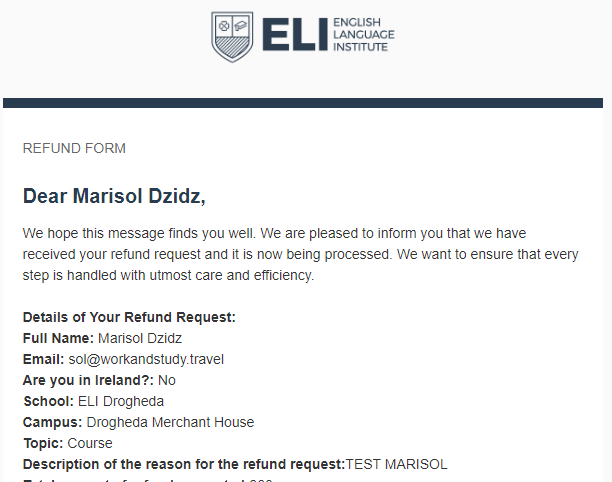
  •  Email Notifications: We've implemented an email notification system to inform students that their refund request has been successfully received, providing them with details about the submitted data.
Email that the student receives
  • Visa Refusal Refunds: Refunds related to "Visa Refusal" are now directly routed to the refunds screen managed by Leslie.
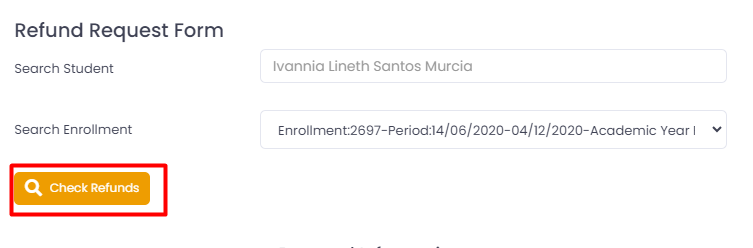
  • New Feature in "Refunds Pre Approval": A Check Refunds" button has been added to the "Refunds Pre Approval" section. This button allows users to view processed refunds associated with the student's enrollment.
Refunds Pre Approval
  • Quick Access to Refunds: On the Refunds Reviewed and Refunds views, a "View Refunds" button has been incorporated for easy access to all refunds associated with the student's enrollment.
Refunds reviewed 

Changes on the "Refunds" Screen:

  • Refunds in the "Not authorized" status can no longer be modified. The only available option is to send them back to the senior manager. Upon doing so, they will appear in the "Reviewed" screen and will require approval again before being visible in the "Refunds" screen.
  • Refunds in the "Complete" status cannot be reverted to previous statuses (In Process, Not authorized).

In addition to these improvements, we've introduced a new refunds report that facilitates viewing all refunds in the "In Process" status. Date filters by month have also been added for better management. You can access this report in the Finance -> Reports -> Refunds Report section.

Mar 05, 2024

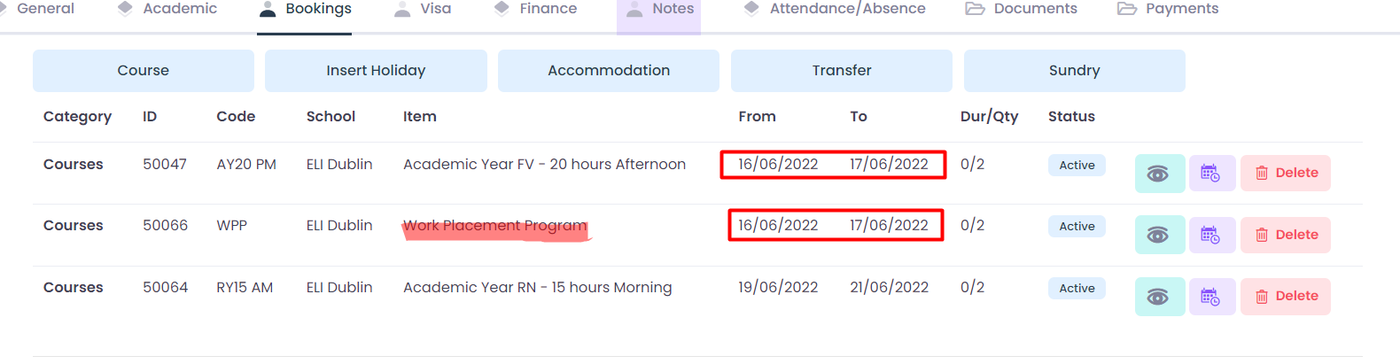
The function for creating and editing filters has been modified to accommodate the inclusion of the "Work Placement Program" course alongside another course during the same dates. It's noteworthy that the "Work Placement Program" has been integrated as an additional element within the course, intended to be added to specific reservations requiring it for proper tracking. Furthermore, this element has been excluded from the main validations to ensure its seamless operation.

This request was made by the admissions department.

Mar 04, 2024

Description of the Issue:

  • Problem: Inability to create new accommodation items in the system. Specifically, when a booking is for 4 weeks and needs to be split into 2 different accommodations, the system does not permit the creation of a second accommodation item.
  • Impact: This issue is critical as it prevents the placement of students and the generation of necessary letters.

Video Demonstration of the Issue:

Resolution:

  • Status: Resolved as of 04/03/2024
  • Details: Modifications have been made to the accommodation management module, allowing the creation of multiple accommodation items for a single booking. This facilitates the placement of students into different accommodations over their booking period.
  • Testing: The fix has been thoroughly tested and verified.  loom.com/share/0ca8ea79a81644a...
Feb 28, 2024

A problem was detected involving the creation of two classes on the same dates for a student. To address this issue and prevent future inconveniences, the following enhancements have been made to the system:

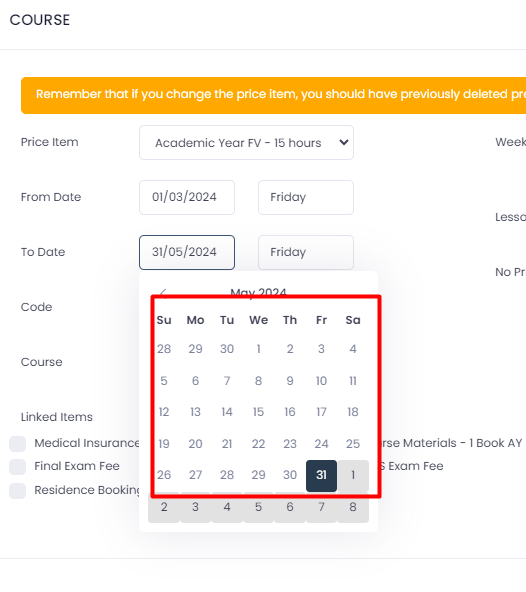
  • Validation in the Course Section: A validation has been added to the course section to prevent the creation of courses with dates that do not fall within the established enrollment period (arrival start date and departure start date of enrollment). This solution involves directly blocking dates that are not allowed on the calendar.
Blocked dates with gray background
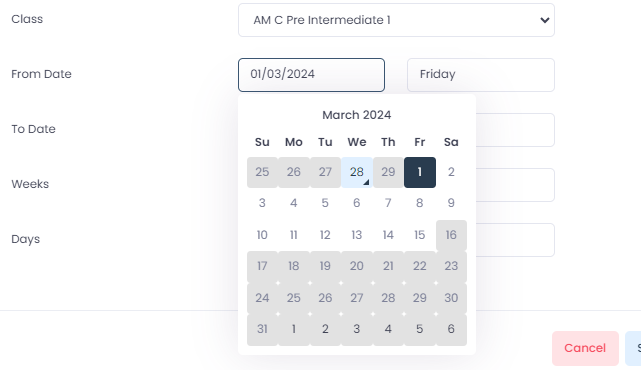
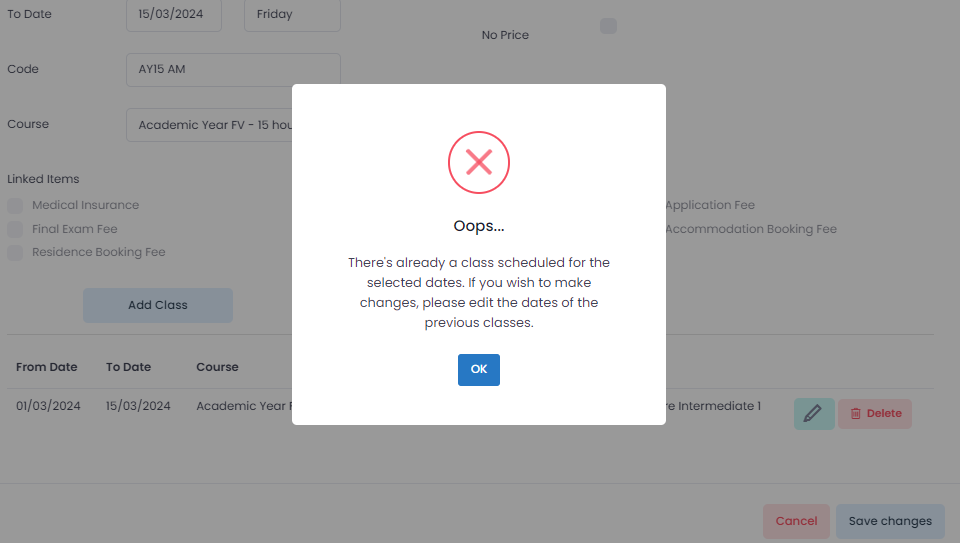
  • Validation in the Class Section: An additional validation has been introduced in the class section to avoid date overlap. This means that a class cannot be added on a date where another class is already scheduled. Additionally, date blocking has been implemented on the calendar to ensure that classes fit within the established course range.
Classes are now blocked based on course ranking.
Attempting to schedule a class on dates where there is already a class scheduled.

With these improvements, the system now ensures that classes or courses cannot be added that overlap in time. Furthermore, it prevents the introduction of dates where the end date is before the start date, or vice versa. 

Starting today, February 28th, 2024, any classes or courses created should not appear duplicated.  

Feb 19, 2024

Dear Users,

We are pleased to announce that we have implemented a significant update to our system, specifically addressing a recently reported issue with the "Move Students" tool. Previously, some users experienced difficulties where this tool did not process students correctly.

Update Details:

  • Technical adjustments have been made to correct the issue with the "Move Students" tool.
  • Improvements have been implemented to ensure precise and efficient processing of students.

Required Action: We kindly ask you to test the updated tool and inform us of any irregularities or if the issue persists. Please communicate through this email thread or our usual support channels.

Feedback: Your feedback is crucial to us. We would appreciate any comments or suggestions you may have regarding the updated tool.

We thank you for your patience and collaboration while we worked on this improvement, and we hope the update provides a more efficient and problem-free experience.

Sincerely,

Feb 19, 2024

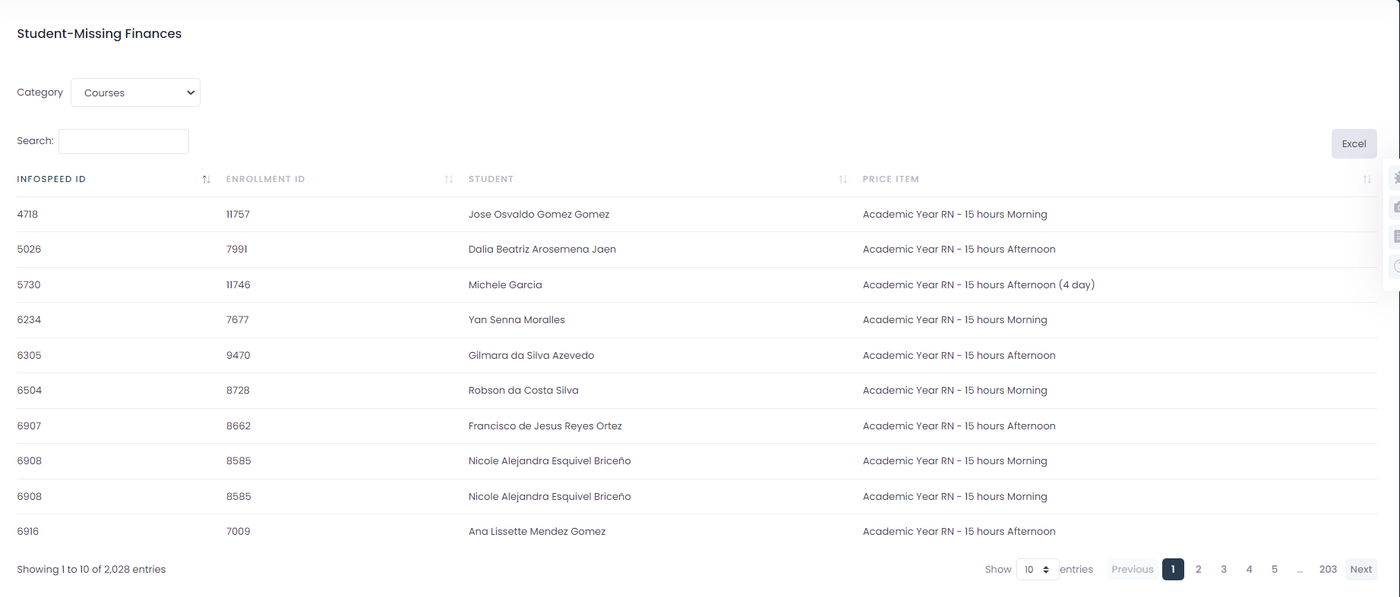
We have conducted a thorough review of the finances module, starting with the analysis of the "View items without Finances" report. During this review, two important fields were added to the table: "From date" and "To date". These dates indicate the start and end of each item, facilitating the identification of any potential duplicates.

Table Report Without Finances

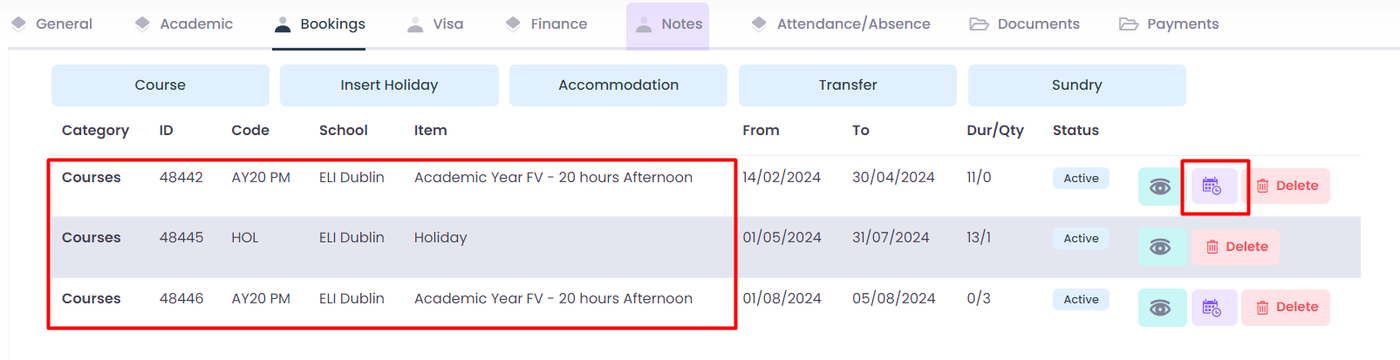
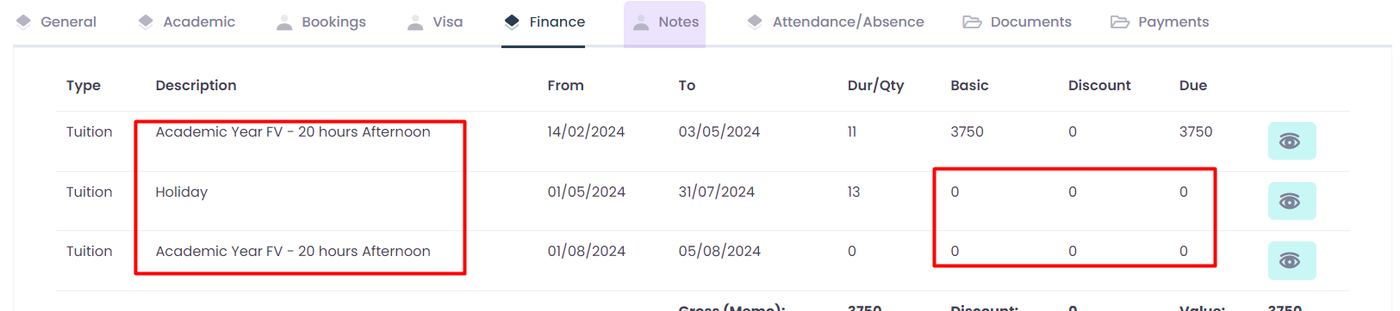
It was reported that there were recurring instances of item creation without finances, particularly when using the "Extend Holiday" function. After thorough investigation, we confirmed this issue to be persistent. Consequently, we updated the function to ensure the proper creation of finances for each item, with a value of 0.

Classes created using extend holiday function
Finance Items created with the extend holiday function

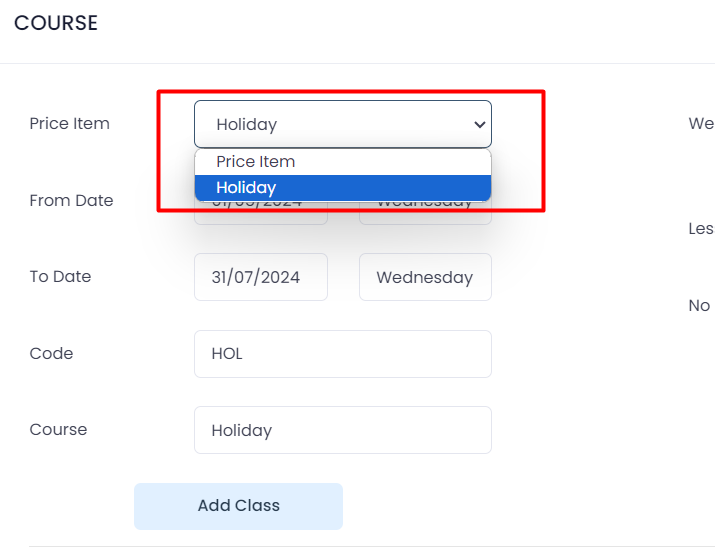
Furthermore, we have updated the price items selector in the course modal to prevent switching to a regular course when the course type is holiday. This ensures consistency in course scheduling and avoids potential conflicts.

To conclude the update, it's important to note that the "View items without Finance" report will display all items within each enrollment where there is an absence of a finance relationship. This will provide a clear overview of any areas requiring additional attention in terms of financial management.

Feb 13, 2024

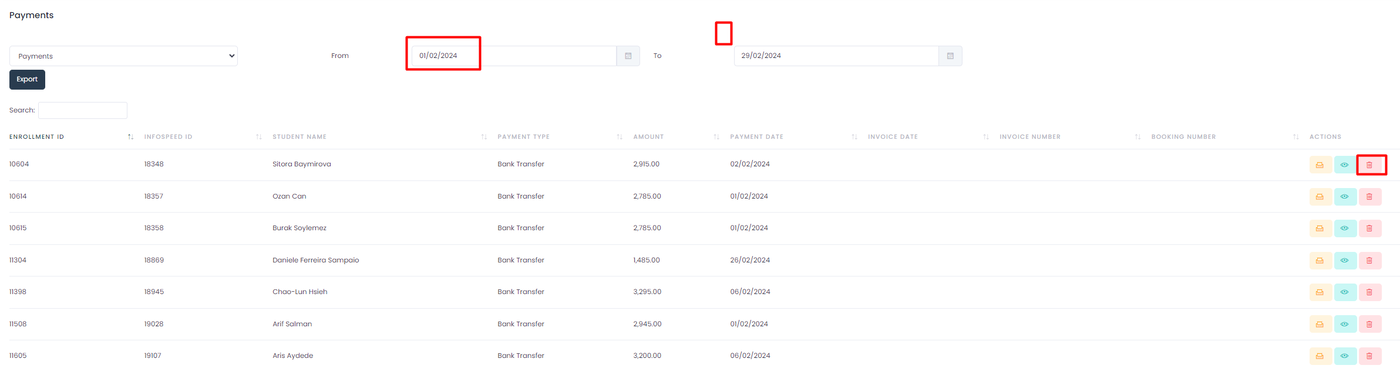
The following enhancements have been made to the payments report:

  • Date filters have been adjusted to encompass the first and last day of the month. This enables visibility of all leads that made payments during the selected month.
  • The edit function has been optimized. Now, when modifying the description, changes will automatically propagate to all related items.
  • A new feature has been added to delete payment leads, allowing for the removal of all associated items with the general payment.

This should ensure a smoother and more accurate reporting experience. 🐛🔨

Feb 13, 2024

Fixed the issue of students appearing multiple times in attendance entry (Provisional Fix): We've resolved the bug that caused students to appear twice or even thrice in the attendance entry. This was leading to double or triple attendance entries for the same student. Please note that this fix is provisional and corresponds to a larger fix, numbered T-3330, which addresses the root cause of the problem and is currently in progress. We are working diligently to provide a more comprehensive solution. In the meantime, this update will ensure each student only appears once in the attendance entry, ensuring more accurate attendance records. We understand the importance of correct attendance data for our users and apologize for any inconvenience caused. Please continue to report any issues you encounter, your feedback is invaluable to us!

Tickets Solved:

T-3457 Student appearing twice in enter attendance

T-3455 Student appearing twice in enter attendance

T-3458 Student appearing in enter attendance twice

T-3459 Student in enter attendance twice

T-3490 Student appearing in enter attendance twice

T-3491 Student appearing in etner attendance twice

T-3494 Student Appearing in Attendance Entry Twice

T-3495 Student appearing THREE times per day in attendance/absence

Feb 01, 2024

Item Report Without Finances: We've created a new report that displays all items missing a finance. This will help you quickly identify and rectify any items that need financial attention. We hope this makes your financial management tasks easier and more efficient!

The following report is located in the finance tab, report section. The report is called "View Items without finance report"

Within the report, you'll discover a selector featuring categories such as 'courses,' 'accommodation,' 'transfers,' and 'sundries.' Making any adjustments to this selector will dynamically update the table to reflect the corresponding data. On the right side, you'll find a button enabling you to export the table information

Subscribe