RELEASE

Jan 30, 2025

1. Residences Dashboard Update: Color & Gender Assignment

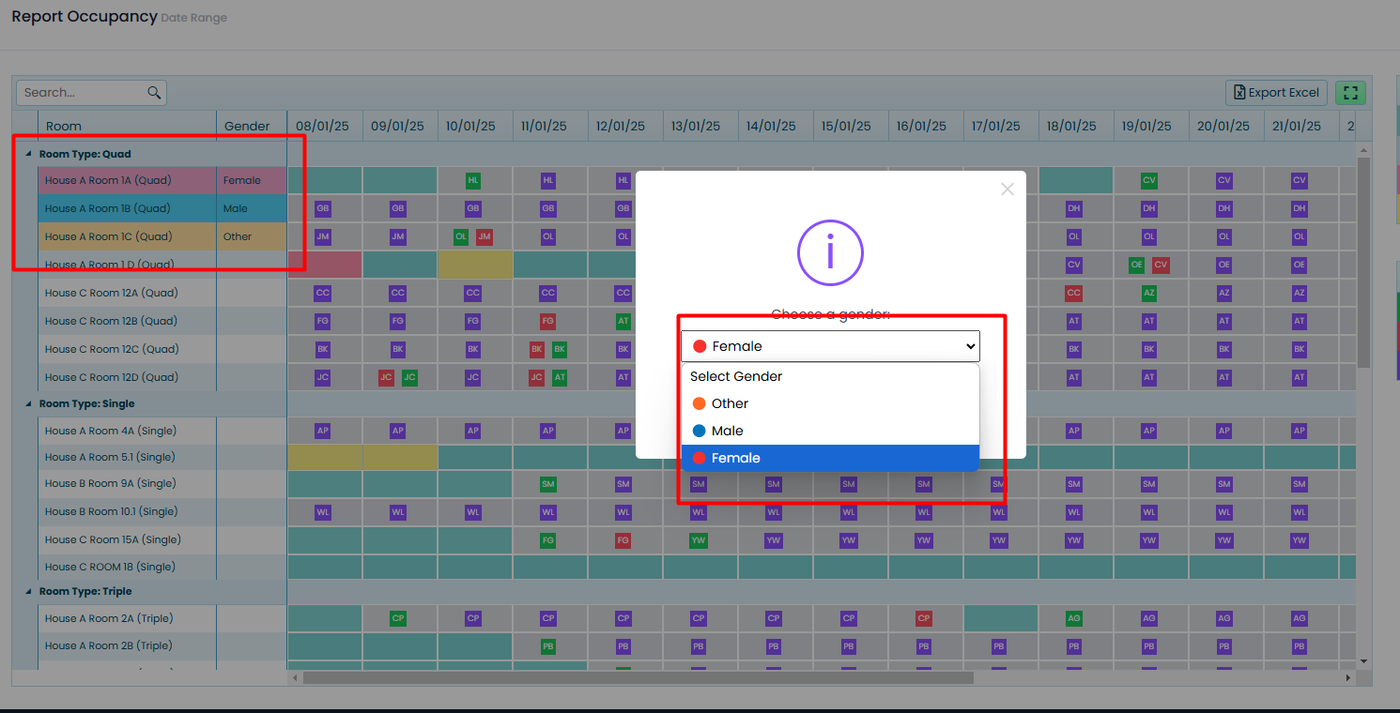
The Residences Dashboard screen has been updated to improve visual control when assigning rooms. It is now possible to assign a color and gender to rooms directly from this screen, making student organization easier.

The available genders in the system are: Male, Female, and Other. The colors implemented were previously reviewed and approved.

Additionally, the Accommodation screen has been adapted to allow the same functionality.

When selecting a color, both the room and gender columns will automatically update with that color, enhancing visualization and management.
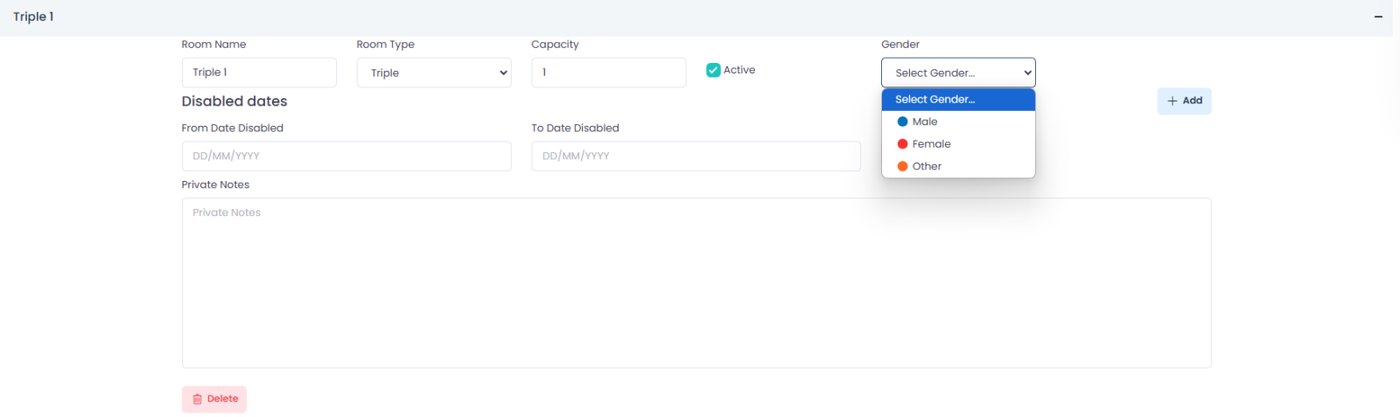
The option to block dates using a range has been added, allowing you to select a "From - To" period for faster and easier management. Additionally, when hovering over a blocked date, a message will display the reason for the blockage.

Jan 29, 2025

1. Report Invoice & Report Tuition

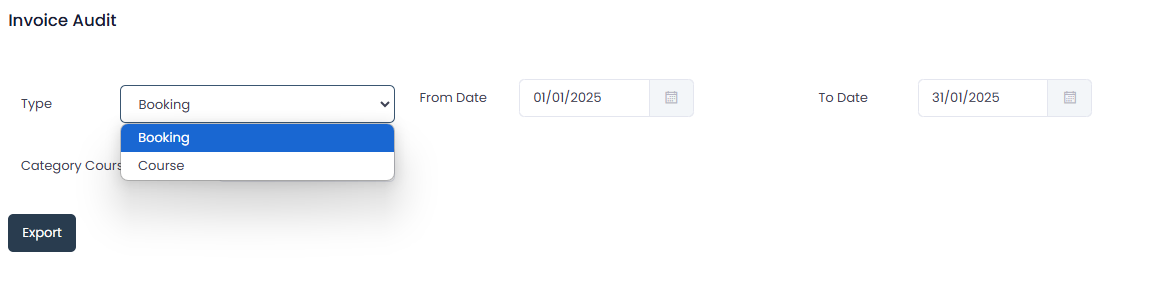
The Invoice Audit report has been updated to support date filters under different conditions. Information can now be filtered by both booking dates and course dates.

Additionally, it was verified that the finance reports correctly display information related to each lead's course weeks.

2. Update Home

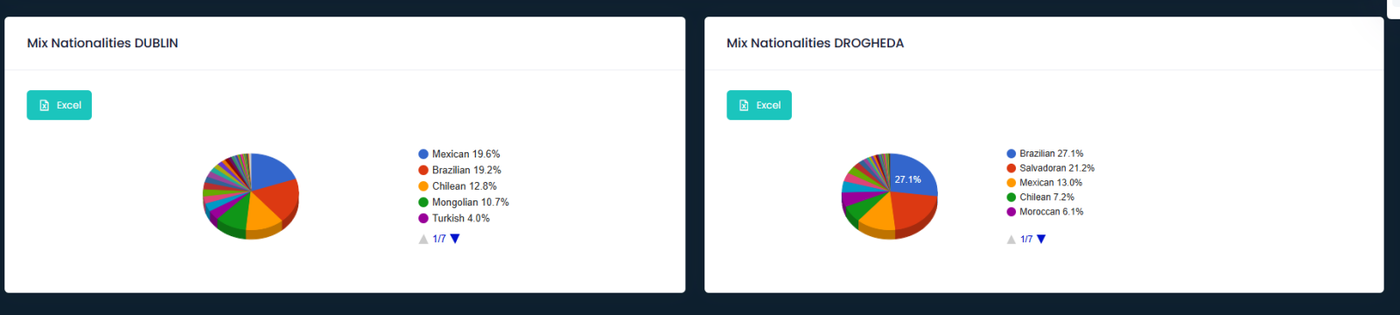
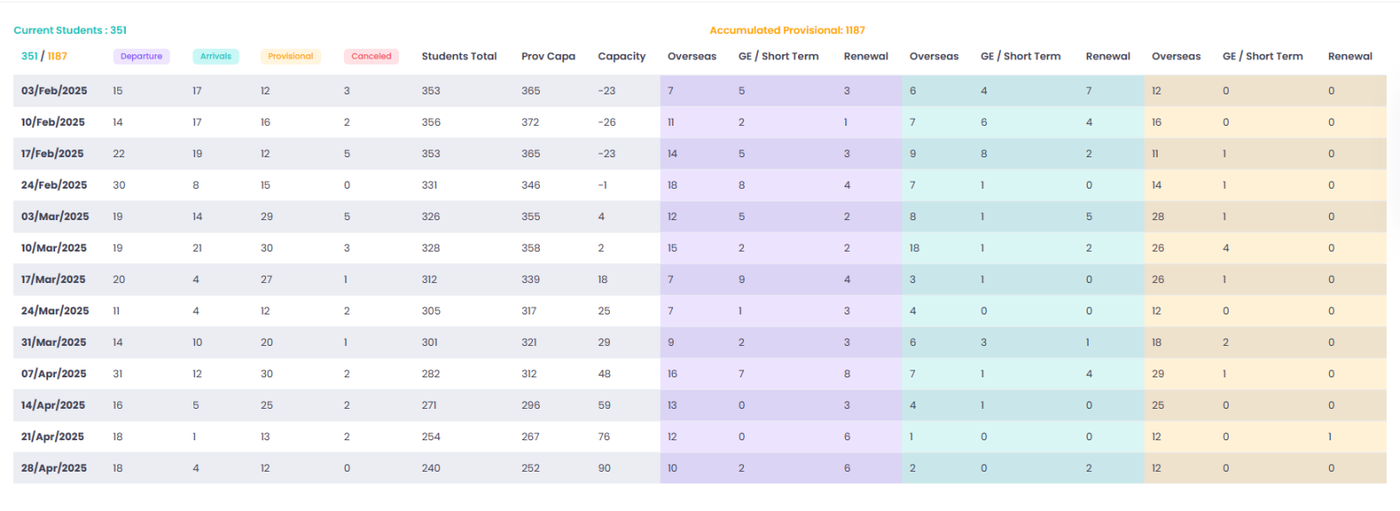
The main screen has been updated to enhance information display. Previously, data was shown for 8 weeks; now, it has been extended to 12 weeks. Additionally, all references to Limerick have been removed.

3. Template Agent

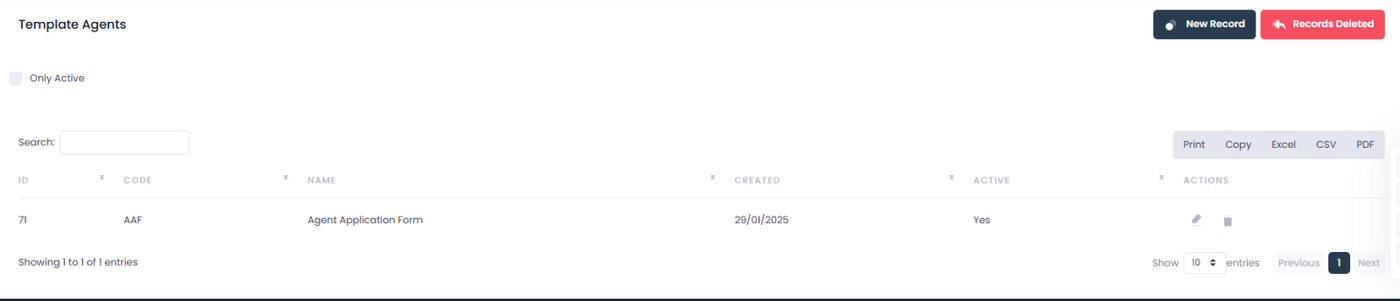
A template generator for agents has been implemented in the marketing menu. This tool allows uploading Word documents and automatically inserting information from the database using specific variables.

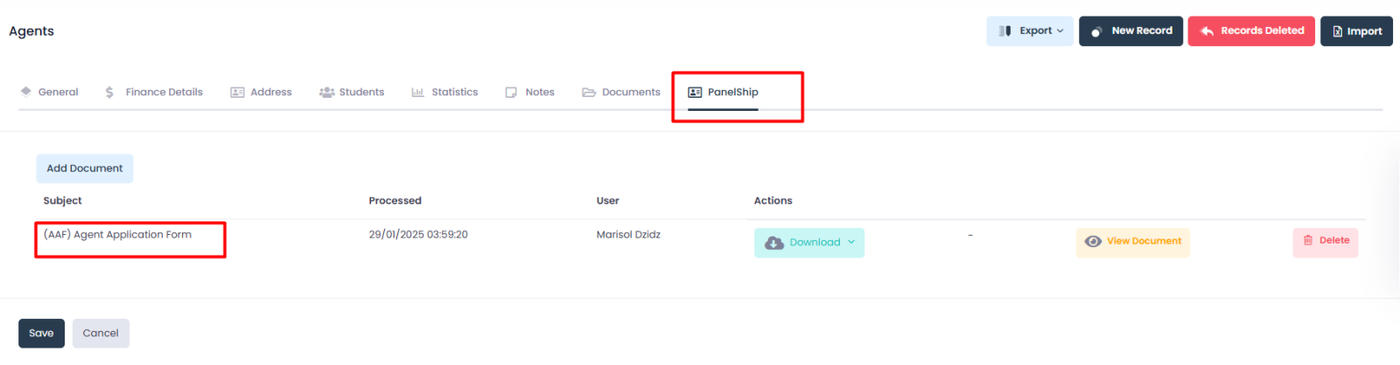
In the Agents section, under PanelShip, the corresponding file is selected to generate the document with the agent's updated data.

Oct 16, 2024

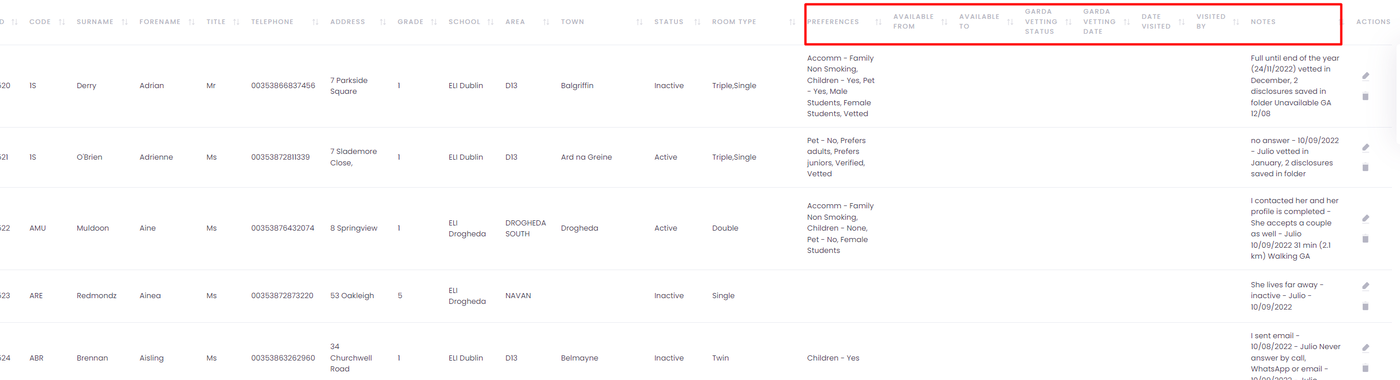
We have updated the accommodations form with the following new fields:

Garda vetting status

visited by

date visited

available from

available to

New columns have also been added to the Hotfamilies report, along with a filter for Garda Vetting status.

May 31, 2024

We are pleased to announce new features in our accommodation system that will optimize room management:

1. Room Disable Option:

  • You can now disable rooms through an interactive modal.
  • This modal allows you to efficiently create, edit, and delete date ranges, making room availability management more streamlined.
  • The Delete All Dates button enables you to quickly remove all dates at once, making the process faster.

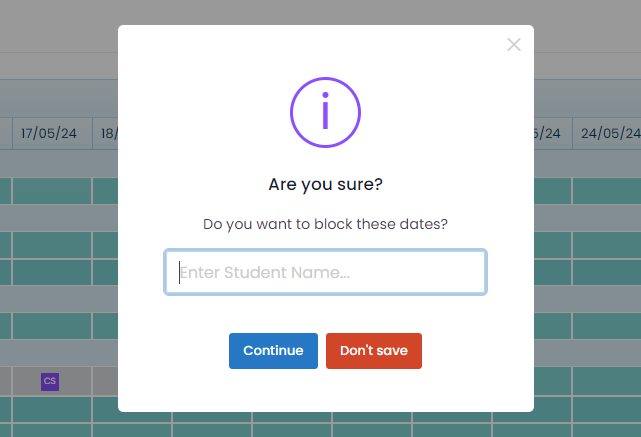
2. Room Block Option:

  • A new feature to temporarily block dates has been added.
  • This functionality allows you to block specific dates for future use, with the option to add an identification text for quick reference.

These enhancements are designed to give you greater control and flexibility in managing accommodations. We hope these new features enhance your experience!

May 16, 2024

We are excited to announce a major update to our project with a revamped design and significant improvements to our accommodations! From design to functionality, every aspect has been carefully reviewed and enhanced to provide you with an even smoother and more efficient experience.

Here are the highlights of the new features:

New Features:

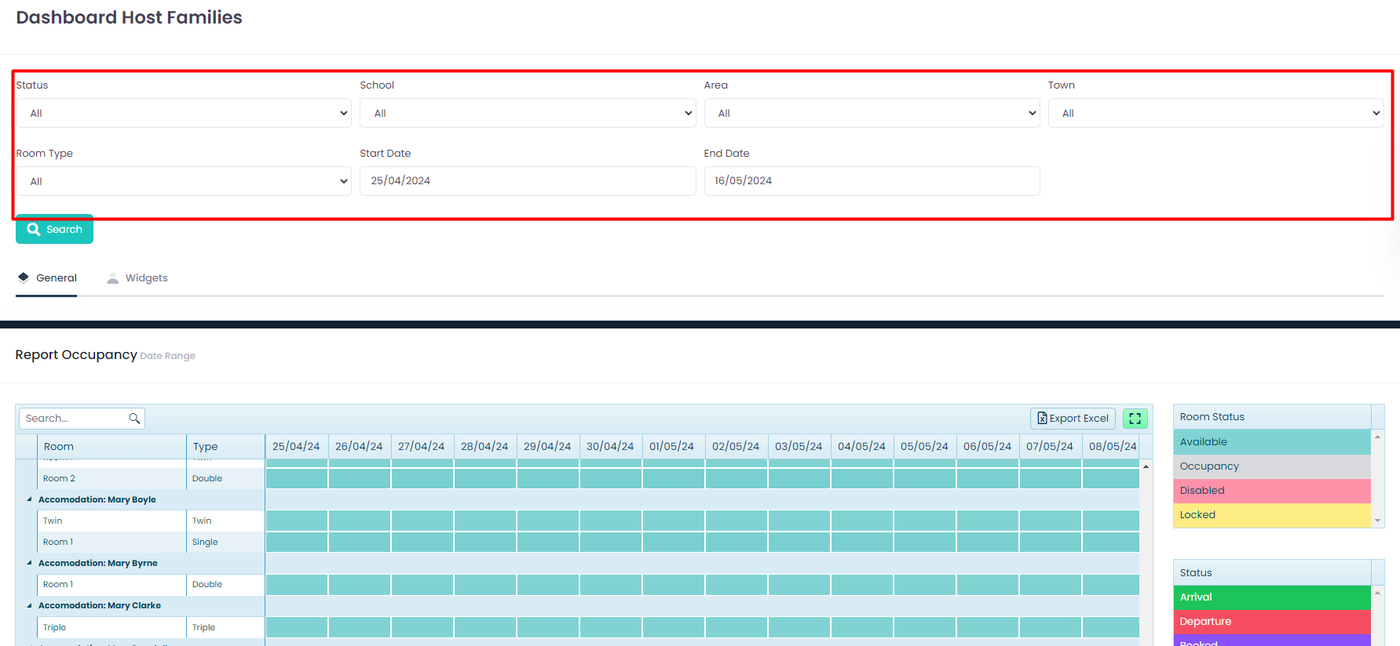
  1. Host Families Dashboard:
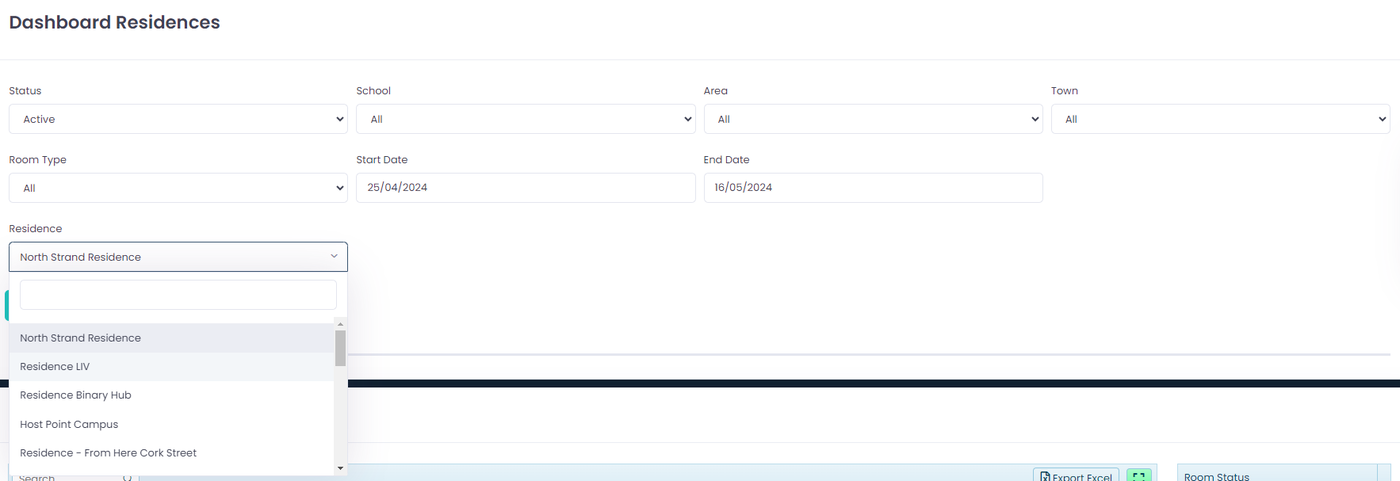
  •  New filters have been added (Status, School, Area, Town, Room Type) that exclusively affect the occupancy report.
  • The new occupancy view allows you to see available, occupied, disabled, and blocked days.
  • Clicking on available rooms now triggers an alert prompting you to disable or block the room on the selected date. Upon selecting either option, the report will refresh automatically.
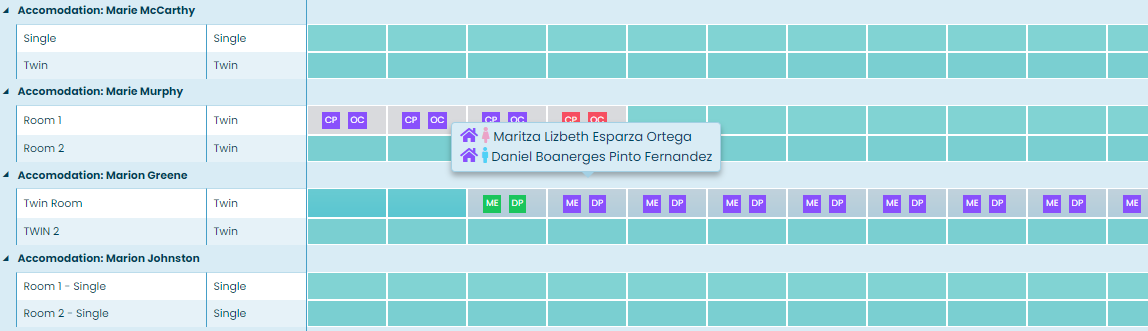
  • Occupied room cells have been improved to display only the initials of students. Hovering over them will instantly reveal the full name of the student, their gender, and status.
  • In this section, all accommodations categorized as "host families" will be displayed, providing a comprehensive overview of this accommodation type.
  1. Residencies Dashboard:
  • Similar to the host families dashboard, new filters (Status, School, Area, Town, Room Type) have been added, affecting the occupancy report. These filters are dynamic and will update automatically upon making a change, allowing you to filter only the necessary information.
  • The new occupancy view provides a clear overview of available, occupied, disabled, and blocked days, with the same alert functionality when clicking on available rooms.
  • The display of occupied rooms has also been enhanced to provide detailed information instantly.

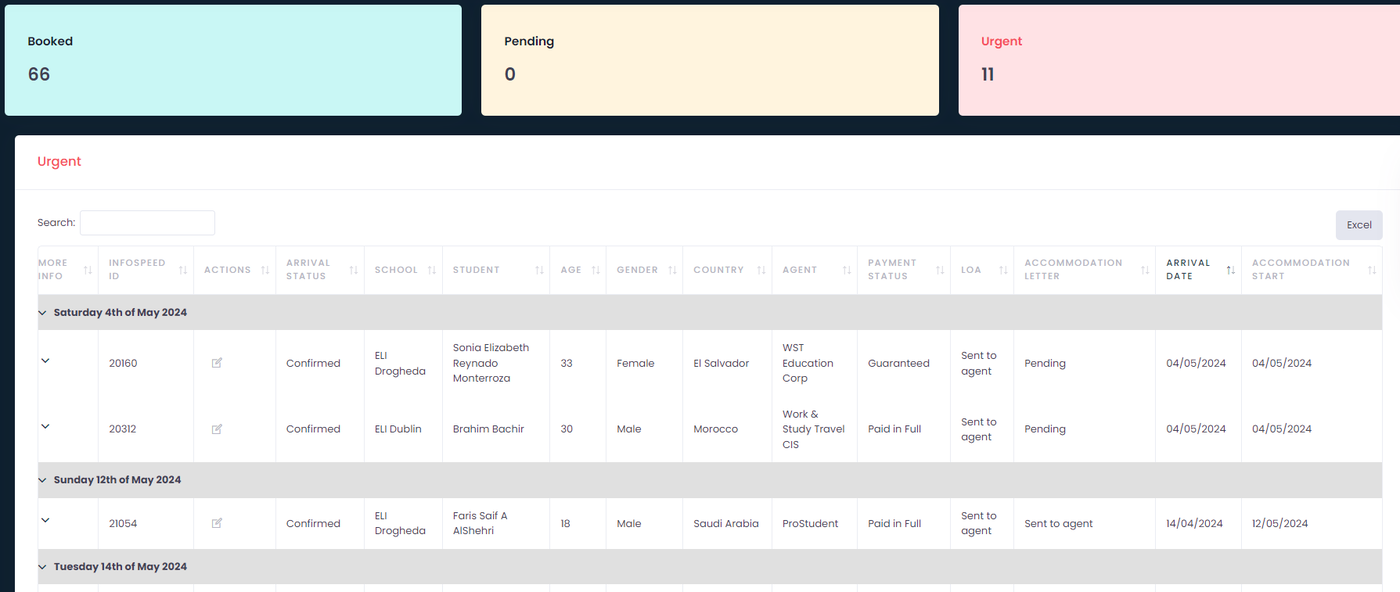
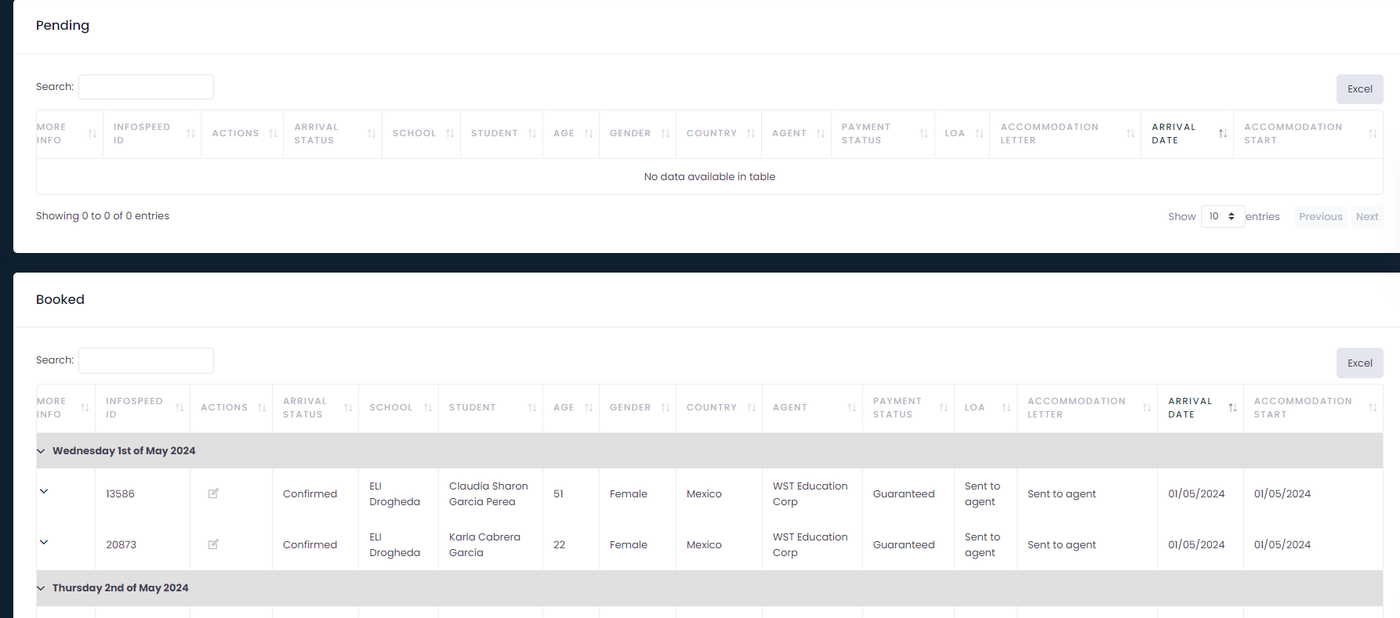
Additionally, we've introduced a section for accommodation reports that includes only the options of booked, pending, and urgent, simplifying the management of all information in a single view for user convenience and efficiency.

We're thrilled to share these improvements with you and hope you enjoy an even smoother and more efficient experience with our project!

May 14, 2024

Orion Platform Release Notes

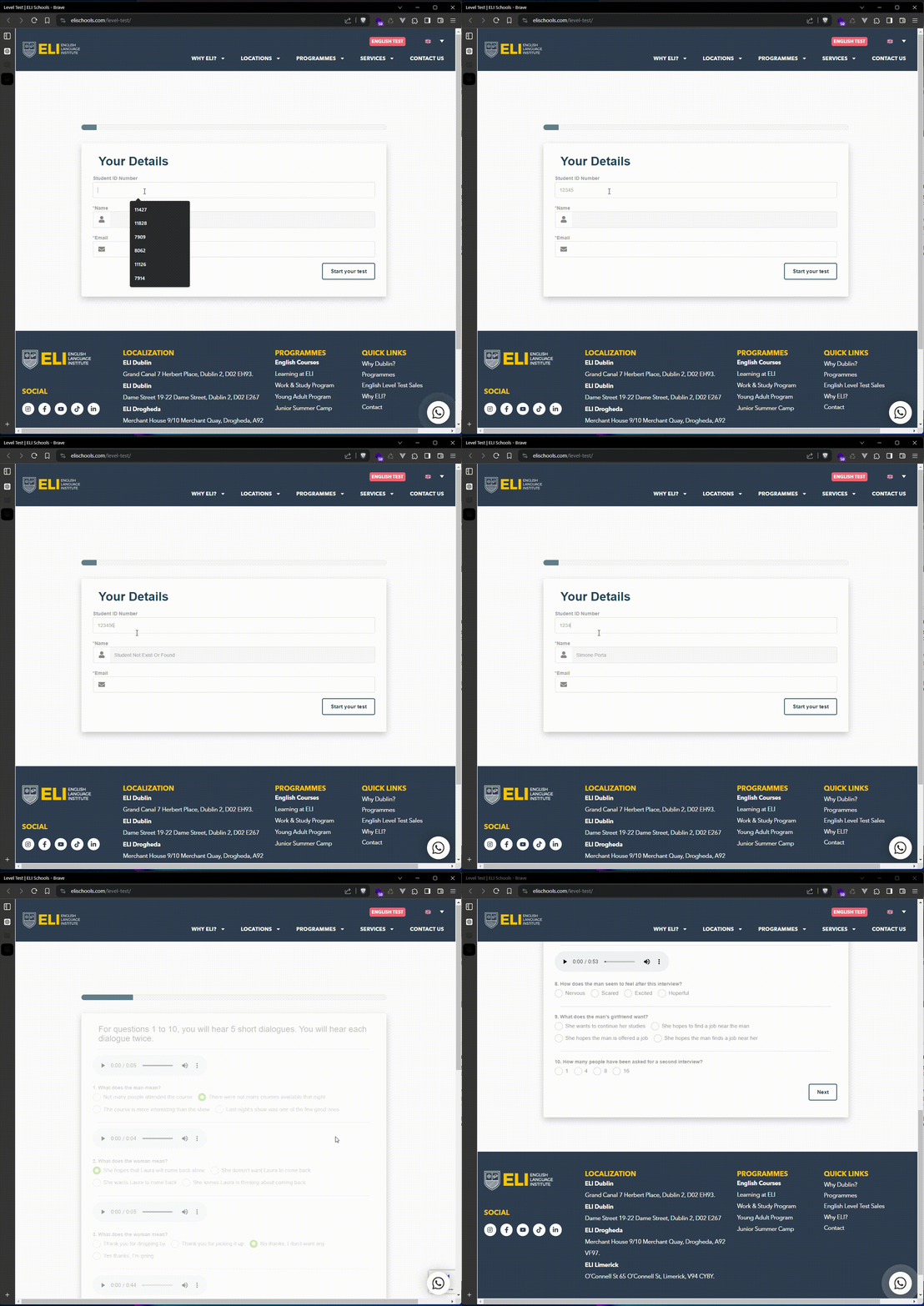
  • Automatic Linking of Online English Level Test Results: It is now possible to automatically link the results of online English level tests to the student enrollment process. This streamlines and simplifies registration, ensuring that test results seamlessly integrate into the student's profile.
New Online Test
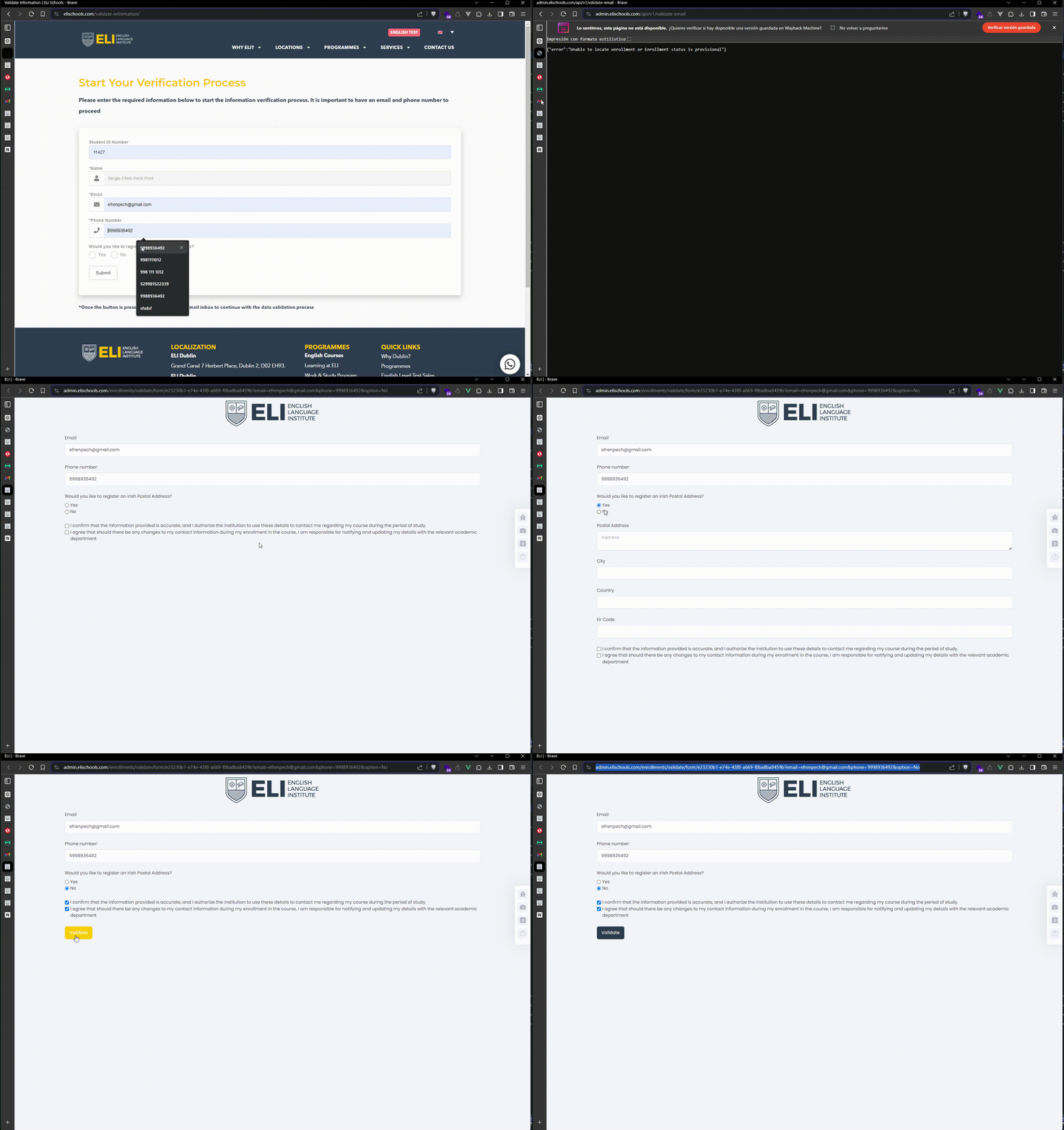
  • External Validation of Student Information: We have added a new functionality for external validation of student information. Students need to incorporate their InfoSpeed ID and email address, allowing their information to be automatically linked. This ensures the accuracy and integrity of data in our system.
Validate Information form

Enhanced Electronic Signatures:

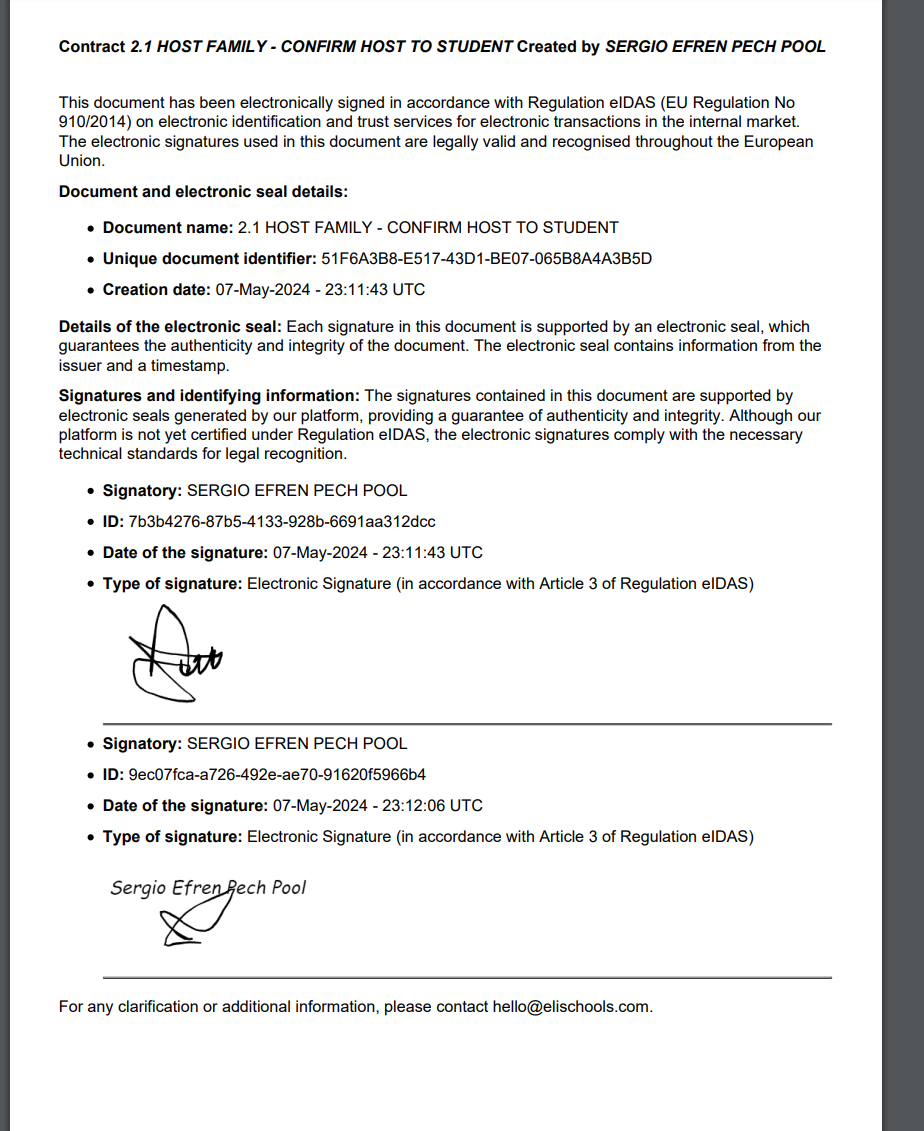
  • Improved Electronic Signatures: Electronic signatures for documents have been enhanced to offer greater security and ease of use.
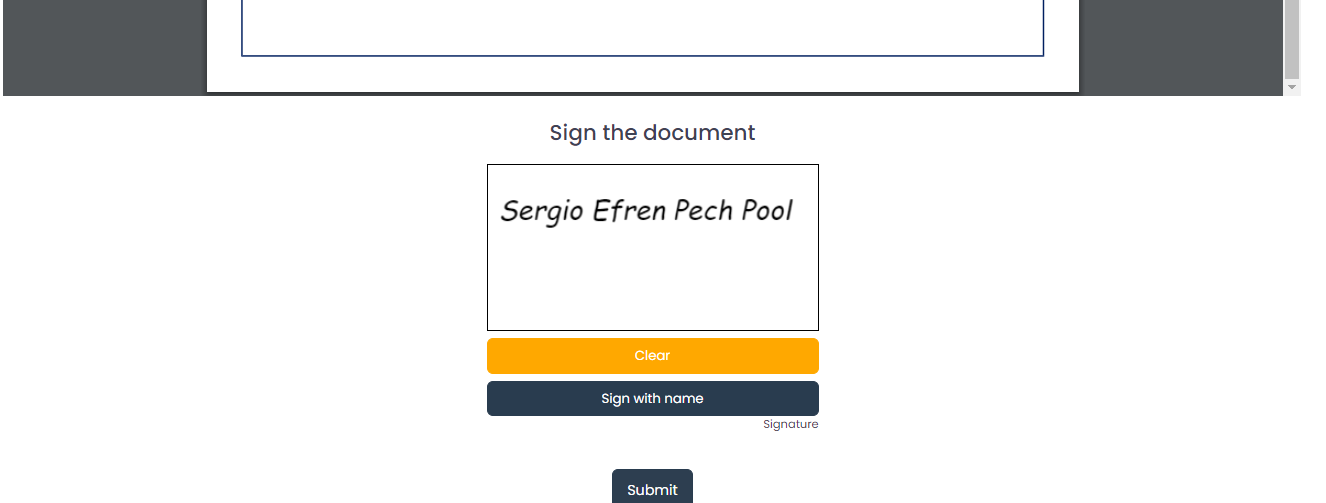
New Signature Template
  • Direct Signature with Student's Name: There is now the possibility to sign documents directly with the student's name, making the signing process faster and more efficient.


Apr 15, 2024

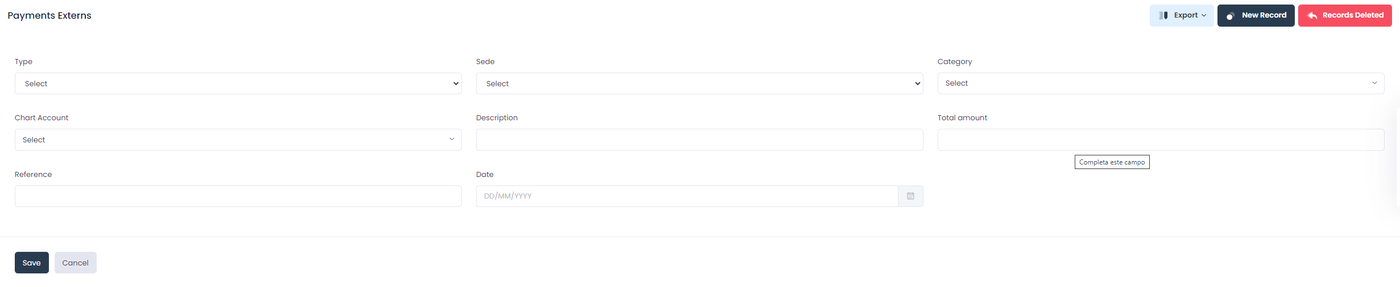
Introducing the External Payments Integration feature. Now, seamlessly integrate external payments into our platform, giving you visibility of these transactions within the Incomes report. This enhancement is tailored to accommodate payments not directly associated with a student.

With this update, effortlessly capture payment details including type, location, category, chart account, description, amount, reference, and date.

Apr 08, 2024

1. Tuition Finances Report: 

Now, you can easily visualize the financial information of your courses, from overall payments to applied discounts and more. With date filters built right in, you can pinpoint the data you need and effortlessly export it to Excel for further analysis.

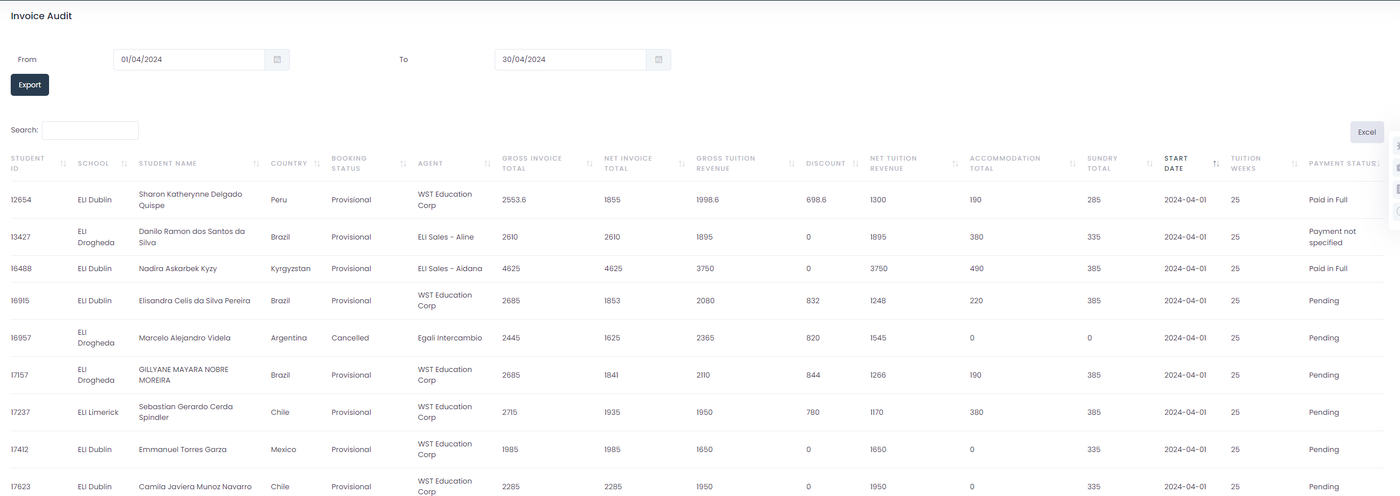
2. Invoice Audit Report:

Our new Invoice Audit report provides comprehensive insights into course fees, accommodations, and sundry expenses. Like the Tuition Finances Report, it offers date filtering and seamless export to Excel, empowering you with actionable financial data.

Apr 08, 2024

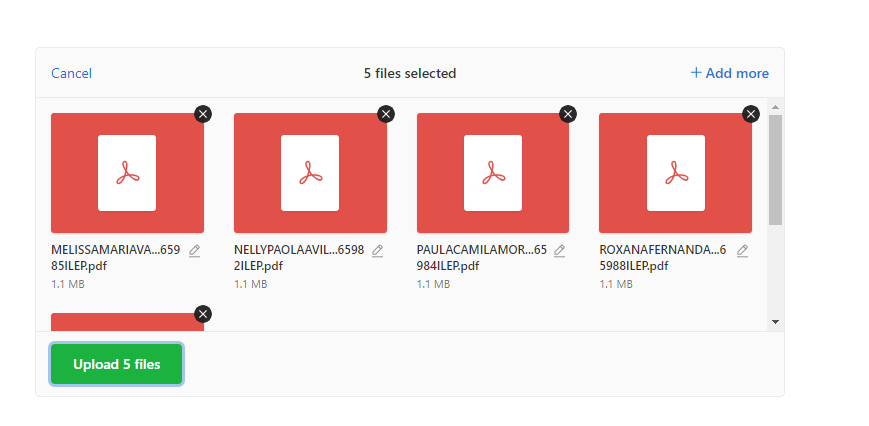
With the aim of enhancing student management and complying with the learner protection policy, we have implemented this tool that allows you to attach PDF files corresponding to Learner Protection. Now, you can easily update student enrollments with the learner protection policy and change their status to "Processed".

Furthermore, with this update, attached files can be viewed online, providing a more intuitive and accessible experience for all users.


Importer
Change status
PDF viewer from enrollment
Apr 08, 2024

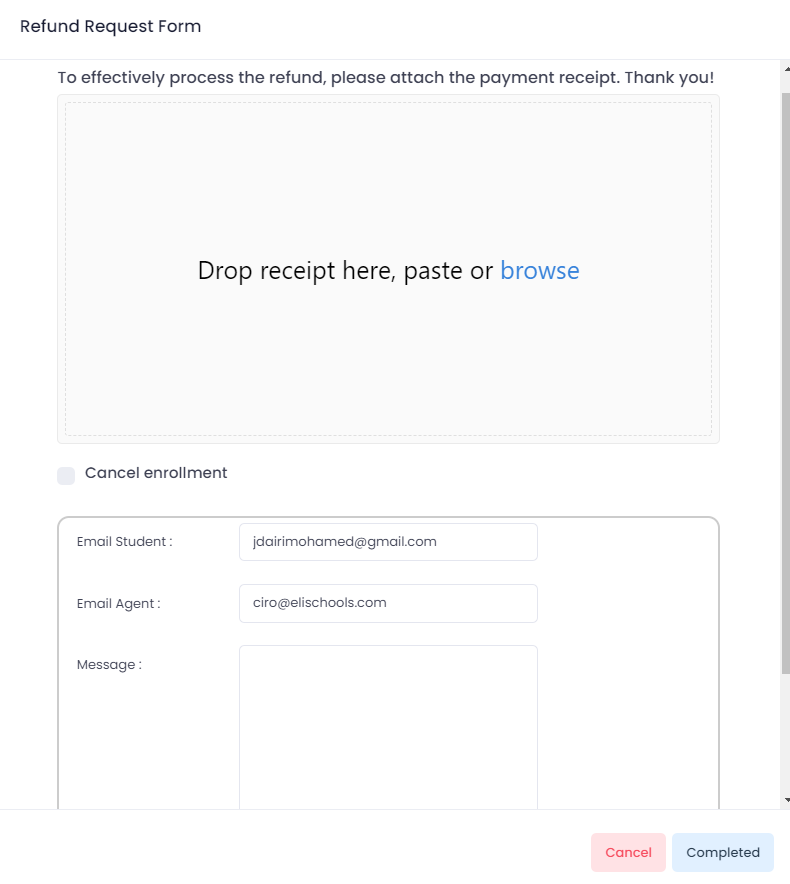
  1. Refunds Receipt Update: We have updated the Finances refund screen to ensure that every refund request is accompanied by a payment receipt. Going forward, it will be mandatory to attach a payment receipt to complete any refund request. This ensures accuracy and accountability in the refund process.  

2. Automatic Cancel Enrollment: To further streamline the refund process, we have added a new feature that allows administrators to automatically cancel enrollments upon completing a refund. A button (selector) has been included for easy access, providing administrators with the option to cancel enrollments seamlessly.

3.Email Notifications: We are reintroducing email notifications for completed refunds, enhancing communication and transparency. Upon approval, a notification email will be sent to relevant parties, including proof of refund attachment for reference. This ensures that stakeholders are informed of refund status in real-time.    

Completed refund form

4. Refunds Logs: We have introduced a comprehensive log feature that records all historical actions taken on refund requests. This log provides administrators with a clear audit trail, enabling them to track the status and progress of refunds efficiently.

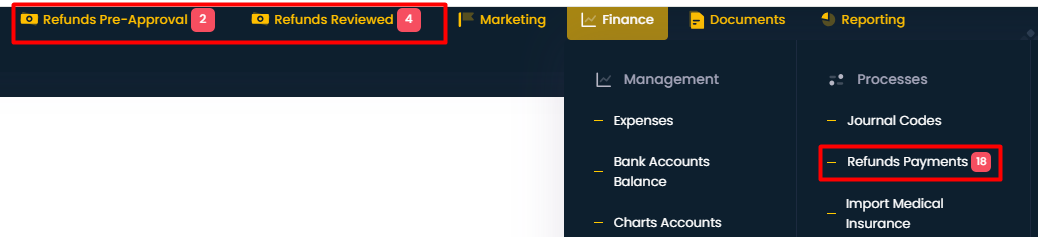
5. Refund Indicators: We understand the importance of timely action on refund requests. Therefore, we have implemented visual indicators to notify administrators when there are pending refund requests. These indicators serve as a proactive reminder, ensuring that refund requests are addressed promptly.  

Feb 01, 2024

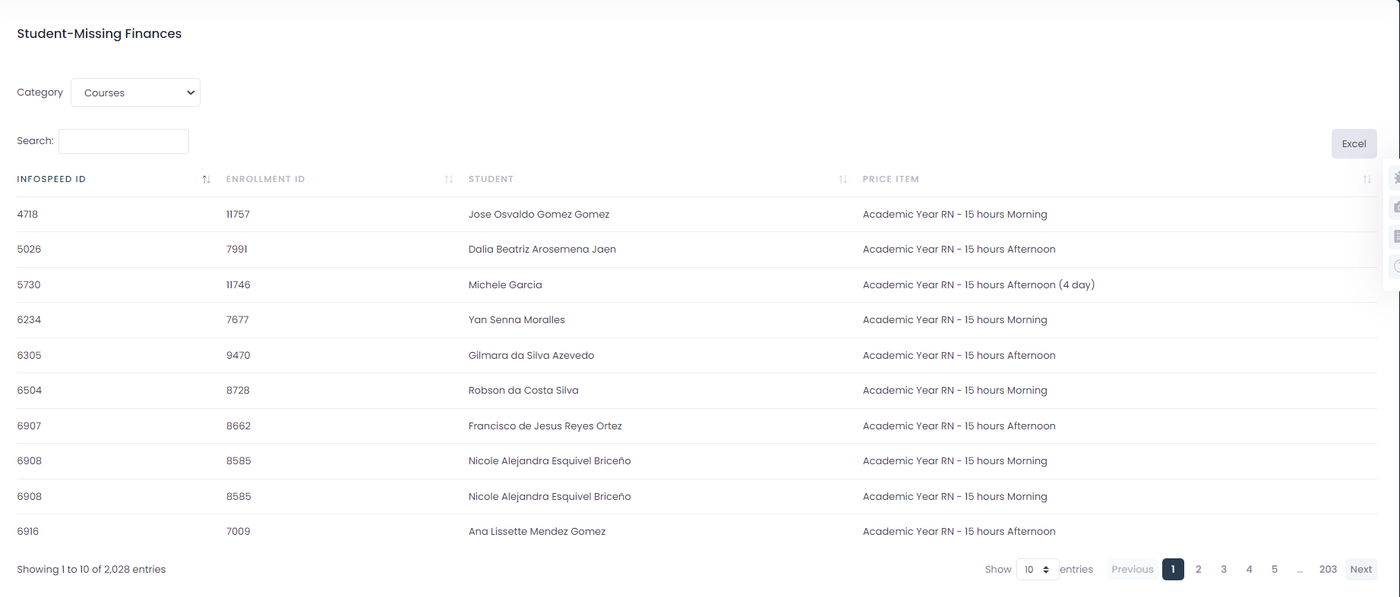
Item Report Without Finances: We've created a new report that displays all items missing a finance. This will help you quickly identify and rectify any items that need financial attention. We hope this makes your financial management tasks easier and more efficient!

The following report is located in the finance tab, report section. The report is called "View Items without finance report"

Within the report, you'll discover a selector featuring categories such as 'courses,' 'accommodation,' 'transfers,' and 'sundries.' Making any adjustments to this selector will dynamically update the table to reflect the corresponding data. On the right side, you'll find a button enabling you to export the table information

Jan 19, 2024

We are excited to announce several significant updates to our system, all aimed at enhancing performance, efficiency, and the monitoring of our background processes. Below are the details of these improvements:

1. Integration of Log-Viewer Library

  • Enhanced Error Identification: We have integrated the Log-Viewer library, a powerful tool that facilitates the identification and analysis of errors within the system. This addition is a crucial step in diagnosing problems more efficiently and providing swift and effective solutions.

2. Queue System Shift: From Database to Redis

  • Performance Optimization: To improve efficiency and reduce the load on our database server, we have transitioned our queue engine from 'database' to 'redis'.
  • Key Benefits:Load Reduction: Migrating queues to Redis significantly decreases the load on the database.Speed Improvement: This change is fundamental in speeding up background processes, leading to a notable increase in the overall system performance.
  • Load Reduction: Migrating queues to Redis significantly decreases the load on the database.
  • Speed Improvement: This change is fundamental in speeding up background processes, leading to a notable increase in the overall system performance.

3. Implementation of Horizon for Queue Monitoring

  • Advanced Job Monitoring: With the installation of Horizon, we now have a robust tool for monitoring and managing background processes.
  • Improved Control and Visibility: Horizon provides us with a detailed and user-friendly interface, allowing more effective control over jobs, including the ability to visualize, manage, and debug queues in real time.

Additional Note

  • Commitment to Continuous Improvement: These updates reflect our ongoing commitment to enhancing and optimizing our system. We will continue to evaluate and implement new technologies and practices to ensure the best experience for our users.
  • Next Steps: We encourage our users to provide feedback on these improvements and to report any issues they may encounter. This input is invaluable to our continuous improvement process.
Subscribe